Macros for the Turtle Beach KONE XP Air · without Swarm
Your macros, on time. … Every time.
Meet MacroForge. A 100 ms repeat that stays 100 ms.
Swarm II drops the pause at the end of a macro and sends half of each macro without checking it arrived. MacroForge rewrites the macro side of the KONE XP Air: exact timing, every packet acknowledged, both layers (primary and Easy-Shift) editable in one click, profiles that follow your games, and a test zone to measure what your mouse really sends.
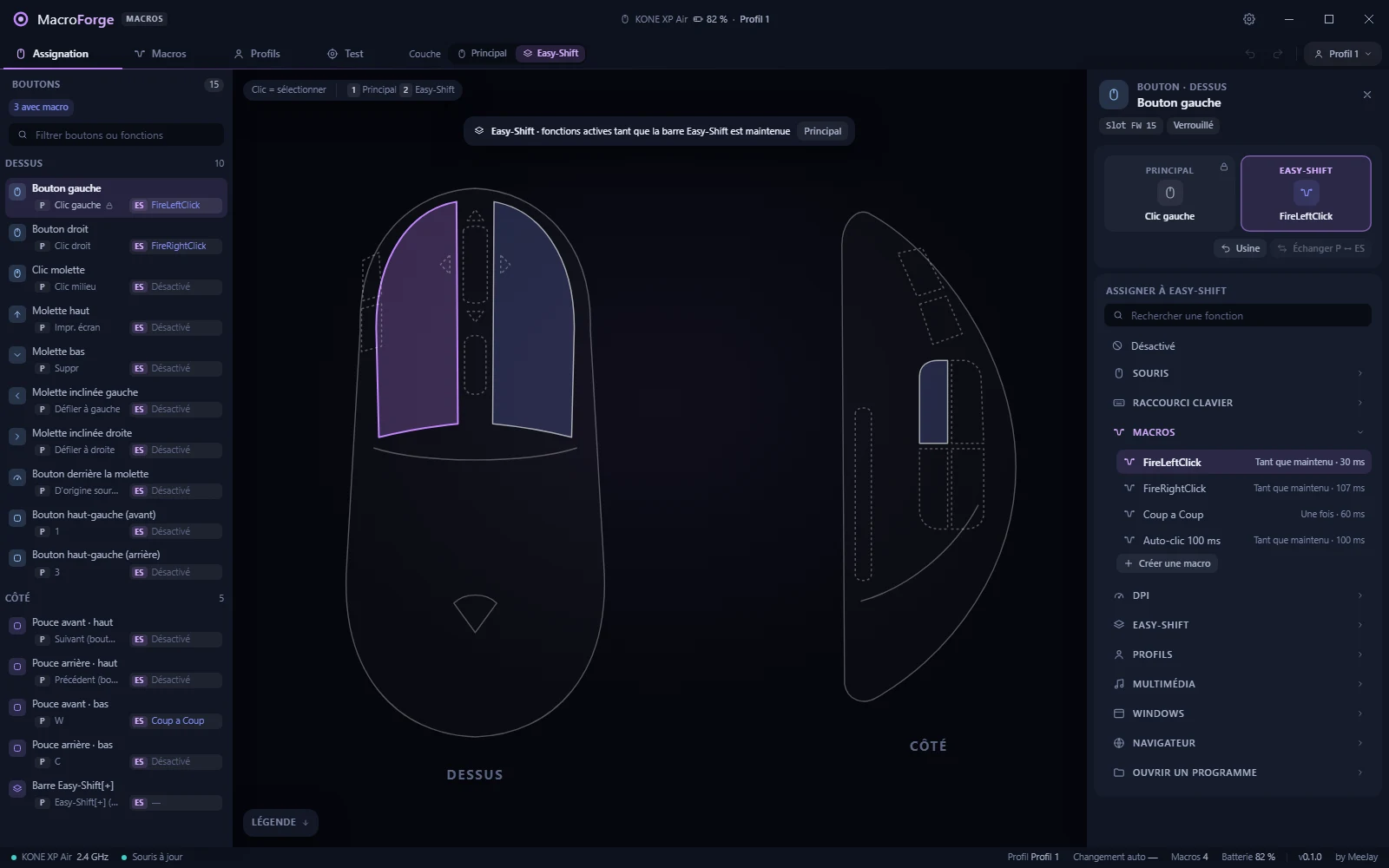
The Assignment workspace: every button, both layers, one click to change a function.
Data100% local · no account
Networkupdate check only · 0 telemetry
MouseKONE XP Air
Writesevery packet acknowledged
Timingto the millisecond
Profiles5 · follow your games
Signature · timing
100 ms means 100 ms.
A rapid-fire macro is a press, a short hold, a release, then a pause before the next one. Swarm II encodes each delay on the next event, so the last pause, the one between two repetitions, has nowhere to go and is thrown away. Your 10 clicks per second become 50.
Swarm II
Press 10 ms, release, pause 90 ms… the pause is dropped. The loop runs every ~11 ms instead of 100 ms, and games miss the clicks. Worse: only the headers of a macro are acknowledged, the 42 data blocks leave unchecked, so a macro can arrive half-written.
MacroForge
The pause is kept: a ×20 ms delay at the end of the stream and the remainder on the first event, so 10 + 90 ms is exactly 100 ms. Every packet is acknowledged by the mouse and a failed block is sent again instead of abandoning the macro. Swarm's own bytes stay reproducible: 55 automated tests, including a real macro read from a KONE XP Air.
Buttons · two layers
Change any button in one click. The left click stays a left click.
Each button has two slots, Primary and Easy-Shift (while the Easy-Shift bar is held). Pick a slot, pick a function: mouse, keyboard shortcut, macro, DPI, profiles, Windows and browser shortcuts. It applies at once, and Ctrl+Z undoes it.
Safety lock
The primary left button can never lose its click, whatever happens. Its Easy-Shift slot stays free for your macro.
Both layers at a glance
The button list shows P and ES side by side; the mouse drawing highlights macros and Easy-Shift.
Shortcuts as macros
Ctrl+C, Alt+Tab, Win+Shift+S… combos the button table cannot hold are written as a tiny macro in the slot, automatically.
No dead layer
Remove Easy-Shift from every button and a banner warns you, with a one-click fix.
Macros
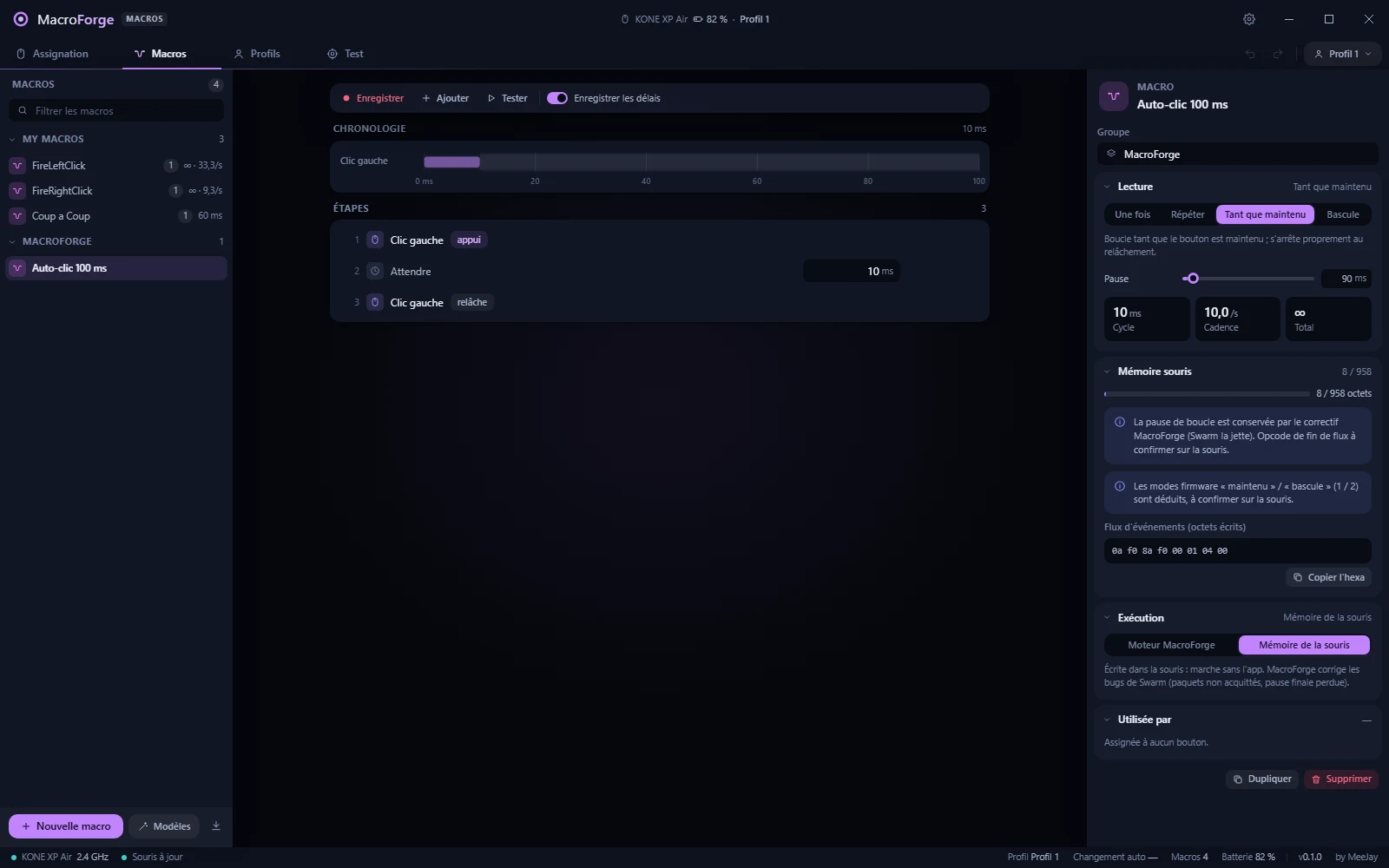
Record, edit, see every byte.
Recorder keys, clicks and wheel, with the real delays or a fixed one.
Timeline and steps press, release, wait: edit every delay to the millisecond, reorder, duplicate.
Four modes once, N times, while held, toggle, with the pause between loops and the resulting rate.
Mouse memory a gauge of the 960 bytes a slot holds, plain-language warnings, and the exact bytes written.
Import from Swarm your whole macro_list.dat library, groups included.
The macro editor: timeline, steps, playback mode and the mouse memory gauge.
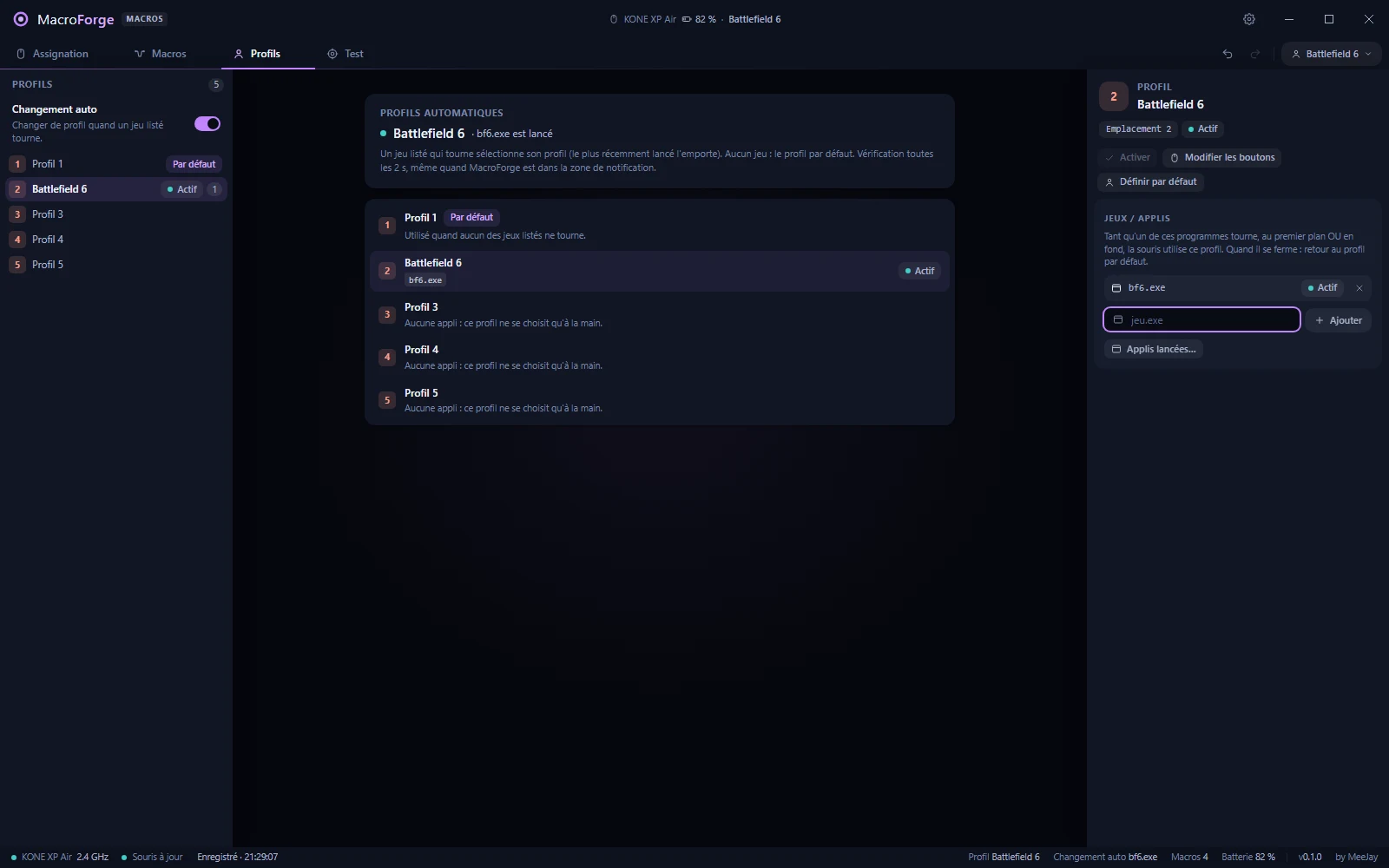
A game is running: its profile is active. Quit the game: back to the default profile.
Automatic profiles
Launch the game, the mouse follows.
List each game under one of the 5 profiles. While it runs, in the foreground or in the background, the mouse uses its profile; when it quits, MacroForge goes back to your default profile. Two games at once: the most recent wins. It starts with Windows and keeps working with the window closed, next to the clock.
Test zone
Measure what your mouse really sends.
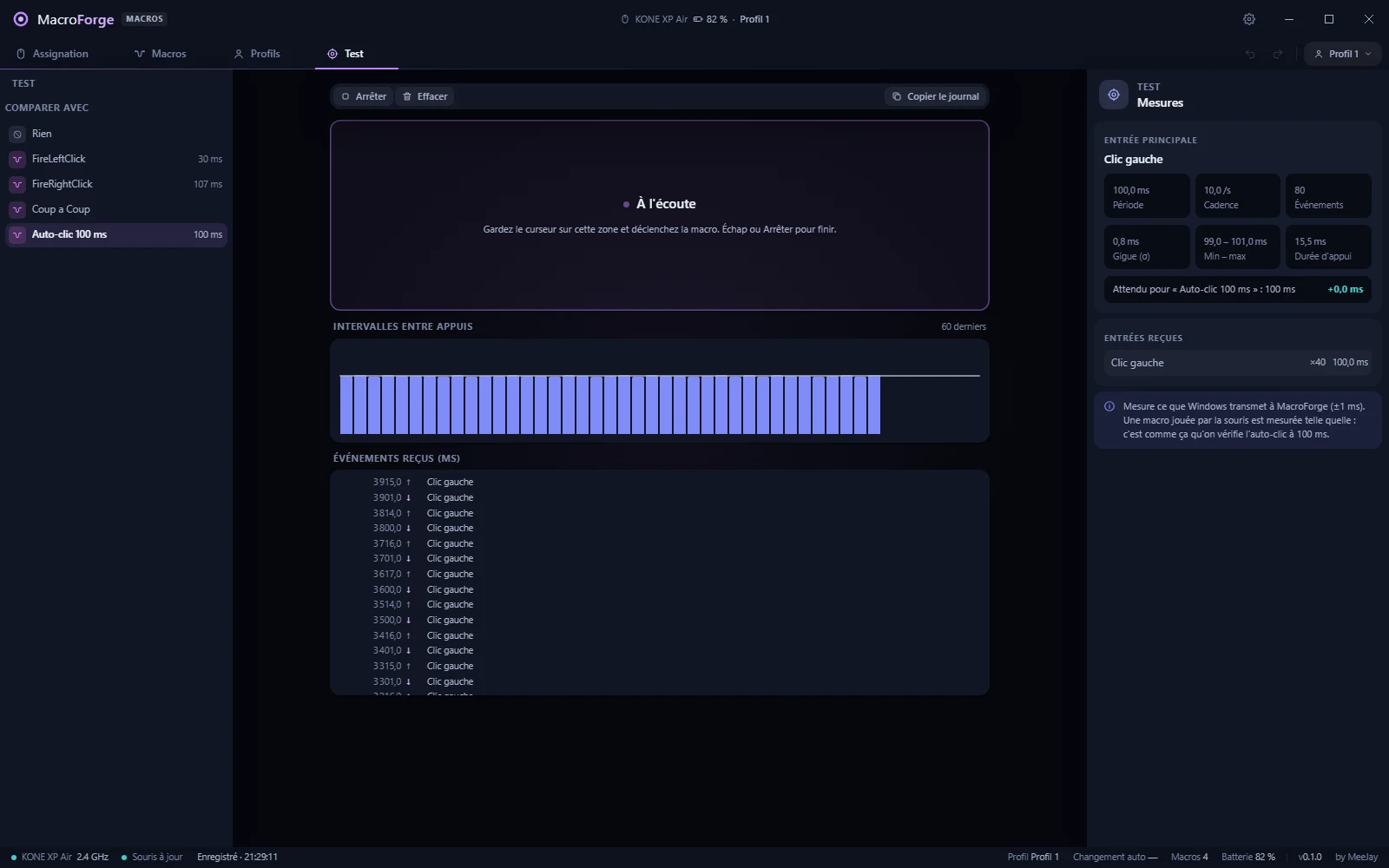
Fire the macro over the test zone: every click, key and wheel notch Windows receives is timed. Period, rate, jitter, press length, compared with what the macro should do. No more guessing whether the 100 ms repeat works.
The test zone: intervals, event log, and the period measured against the expected one.
Your mouse, kept
It reads first. It never overwrites what it does not understand.
Imports, and backs up
On first launch MacroForge reads the 5 profiles and their macros, and keeps a copy of the original bytes: one click puts the mouse back exactly as it was.
Kept byte for byte
A function it cannot decode yet stays exactly as the mouse has it. DPI, polling rate and lighting are never written.
Only what changed
Only the slots whose bytes changed are rewritten, macros before the button table, with the progress in the status bar.
Swarm detected
Swarm II streams lighting on the same channel and makes writes fail: MacroForge tells you when it is open.
Everything else
The rest of a macro tool that gets out of the way.
Tray & Windows startup
Starts with Windows, hidden next to the clock. Pick a profile or pause the auto-switch from the tray menu.
Undo / redo
Every change, up to 200 steps, with an Undo button in each confirmation.
English & French
The whole interface in both languages; keys shown as your keyboard layout names them.
Signed updates
A titlebar button and an hourly check. Signed MSI, installed only when you say so.
100% local
No sign-up, no cloud, no telemetry. The only network call is the update check.
Export
Save your whole configuration, profiles and macros, to a file.
Tiny
A 3 MB installer, a Tauri window that opens instantly.
Battery at a glance
Battery % in the title bar and the tray tooltip, a warning when it runs low; unplug and replug, it follows.
Roadmap
What comes next.
Honest about what ships today: this first release reads your mouse, switches profiles and has the full editor; writing buttons and macros is behind a switch in Options until the hardware validation is finished.
Next update
In progress
Writing on by defaultOnce every write has been validated on the mouse.
Button mapping assistantPress each button, MacroForge names it.
DPI and profile buttons decodedCreate them from MacroForge, not only keep them.
Easy-Shift for the keyboard
Planned
Hold the Easy-Shift bar of the mouse and the keys you chose on your keyboard (QMK keyboards first) switch to their shifted function: a macro, a shortcut, another key. Every other key stays itself.
Latest release
Get MacroForge v0.1.2
Windows 10 / 11 (64-bit) · Turtle Beach KONE XP Air · code-signed · no account · 100% local.
Close Swarm II while MacroForge talks to the mouse.
Signed with a code-signing certificate. Windows SmartScreen may warn until the certificate builds reputation.
Updates are built in: MacroForge tells you when a new version is out.